JBQ Quiz Champ

⚡ Quick Start
▼🎯 Study Mode
▼📋 My QuizLists
⚙️ Custom Practice
▼Round Complete!
All Questions
Challenge Mode
📋 Match Type
▼👥 Players
▼🏆 Match History
▼QuizLists
My Progress
🗺️ Your Journey
▼🎯 Practice Record
▼Overall
By Point Value
📚 By Bible Theme
▼🛡️ Bible Master Seals
▼⚡ Challenge Record
▼✨ Stickers & Badges
▼My People
🏆 Group Leaderboard
⚙ Coordinator Tools
⚡ Live Faceoff
⚡ How Live Faceoff Works▼
JBQ Rules
📖 These rules are from the Official JBQ Guidelines (2026). Know them — they could save you points!
⭐ The Basics — How a Match Works
▼🎯 Buzzing In & Answering
▼✦ Quotation Questions
▼🚫 Fouls — What NOT to Do
▼⏱ Time-outs
▼🔁 Overtime
▼✅ What Makes an Answer Correct
▼📖 Scoring at a Glance
▼🎵 Songs
🛡️ Master Seal
My Question Cards
💡 How to Use
🎯 Your First 10 Minutes
▼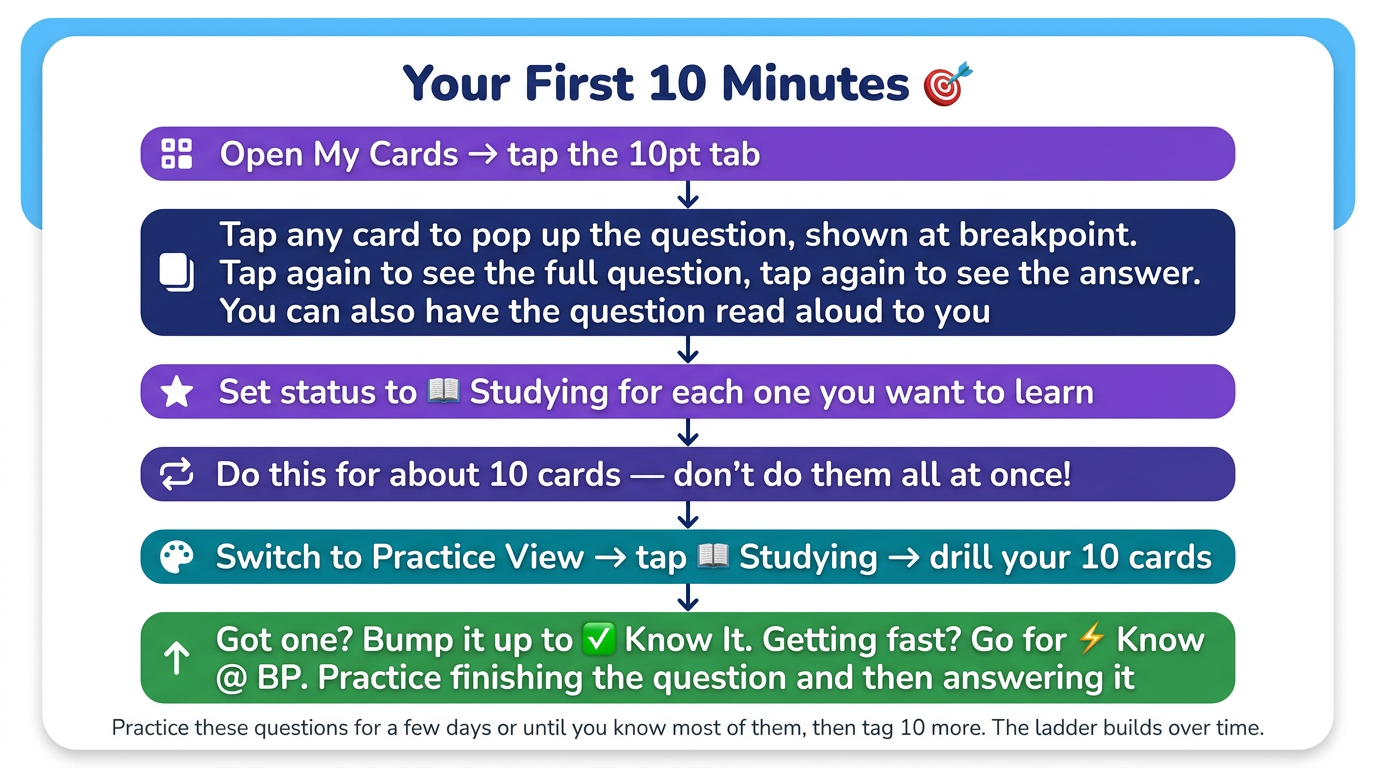
Brand new? Don't open Practice yet — start in My Cards instead. Here's the best way to begin:
⬛ My Cards Tab
▼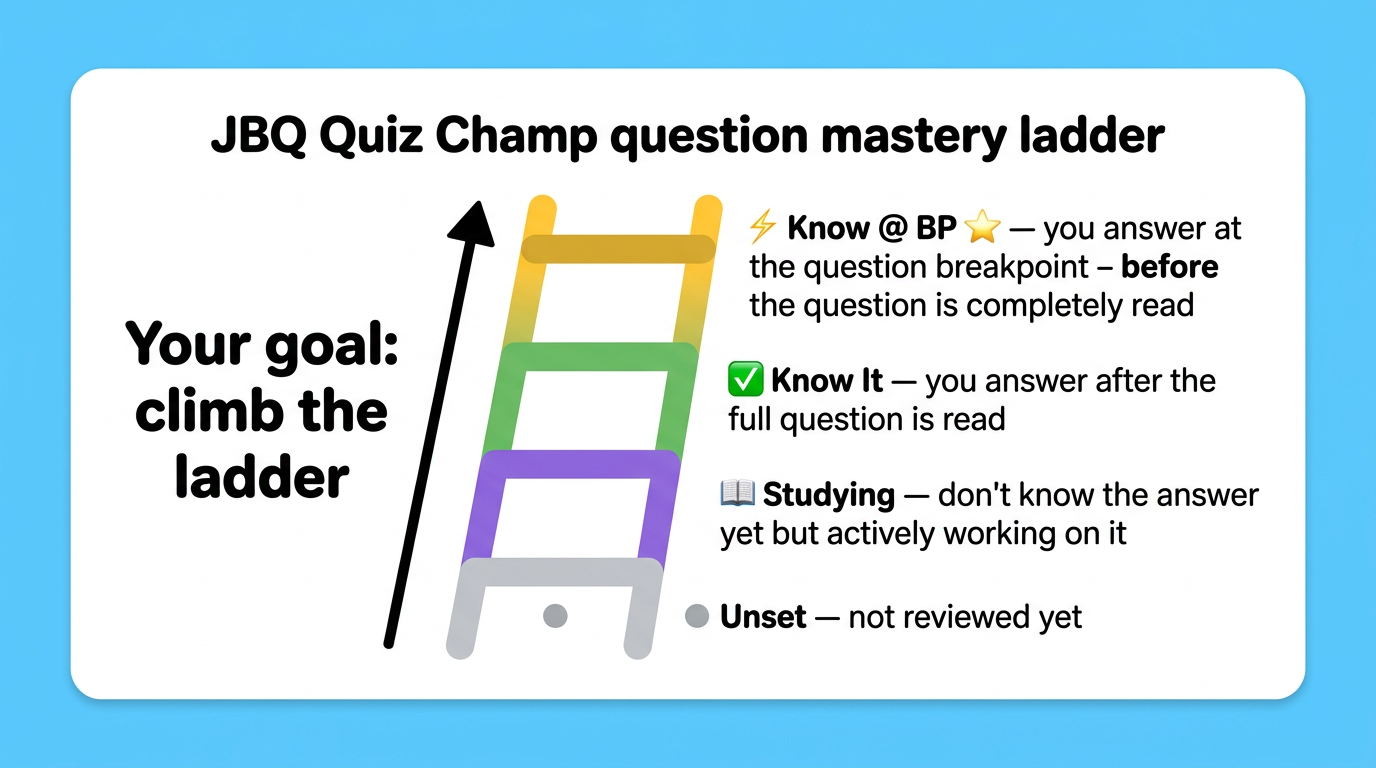
My Cards is your personal study tracker — every question in the bank has a card here, and each one can be tagged with a status. This is where your progress lives.
The Status Ladder:
Three views inside My Cards:
- Grid — colored dots show your status at a glance. Tap any dot to open that question.
- Browse — scrollable list with the question text visible. Good for reviewing specific ones.
- Practice View — filter by status and launch a drill session from right here.
▶ Ways to Practice
▼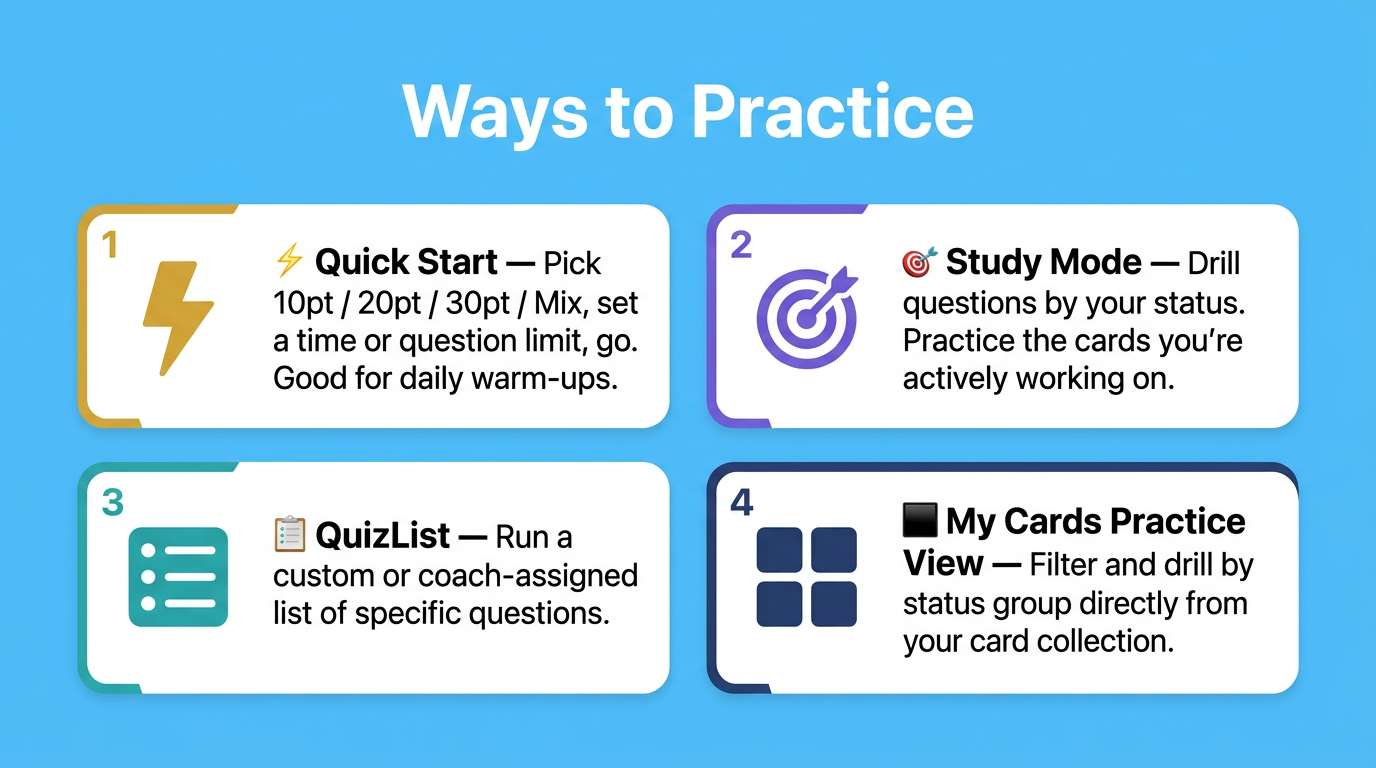
Once you've tagged some cards in My Cards, you have several ways to practice:
📖 During a Practice Session
▼Tap the question card to step through 3 reveals:
- Breakpoint — highlighted in gold (this is where you'd buzz in)
- Full question
- Answer
Read Aloud — tap the bar to open audio controls. Buttons step through: ⚡ To BP → ▶ Rest of Q → 💬 Answer. Great for hearing the correct pronunciation and phrasing.
Got it right / Got it wrong — tap to score yourself. The stat bar at top tracks Correct, Wrong, In Set, and ⬆ Leveled Up (questions you promoted this session).
My Cards button — tap mid-practice to set or update the long-term status for the current question.
+ QuizList — tap to add the current question to a saved list on the fly.
⚡ Champion Mode
▼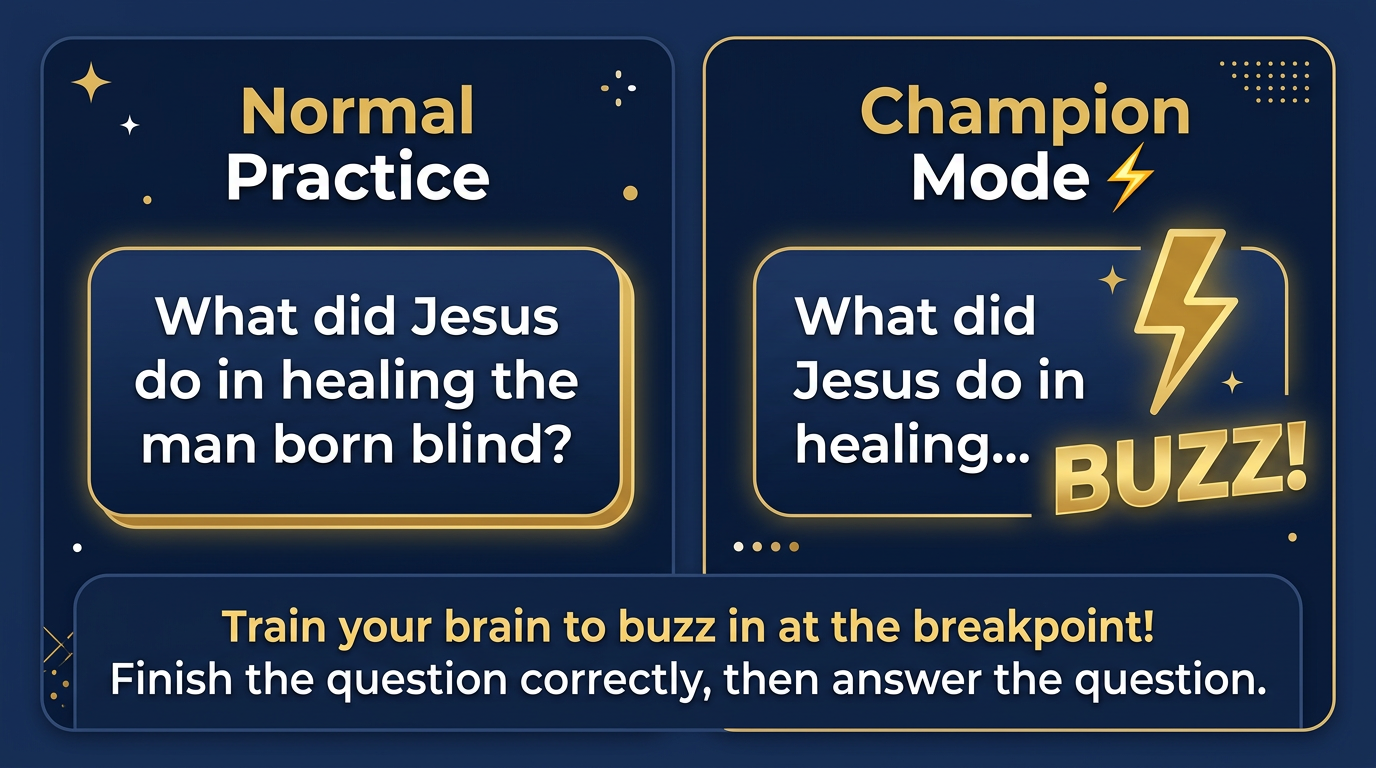
In a real JBQ competition, quizzers buzz in before the question finishes — the moment they recognize it. Champion Mode trains exactly that skill.
Turn it on in the ··· More menu. During practice, questions stop reading at the breakpoint — the key word where a quizzer would ideally buzz in. The card shows just the beginning of the question. Tap to reveal the rest, then answer.
The goal is to hear the first few words, recognize the question, and buzz in at exactly the right moment — not too early, not too late. Champion Mode is the most realistic home practice you can do.
📋 QuizLists Tab
▼Build your own custom practice sets. Tap + Create New QuizList, give it a name, then browse and check the questions you want. Tap ▶ on any list to practice it. You can also add questions mid-practice by tapping + QuizList on the question card.
From Coach — Coach Korinne can push lists to the whole team. These appear automatically in your QuizLists tab — tap ▶ to run them just like your own lists.
🏆 Playing Against Others
▼Challenge Mode — Head-to-head on one device. Pick a match type (Beginner, Advanced, Custom, or a specific QuizList), add players, and tap ▶ Start. Questions rotate between players — whoever answers correctly earns points. Perfect for siblings practicing together.
⚡ Live Faceoff — Real-time multiplayer on separate devices, up to 6 players. One person creates a room and gets a code. Others join by entering that code. The host picks the question set and starts when everyone's in. Everyone sees the same question at the same time — mark yourself right or wrong honestly!
🎵 Songs Tab
▼Most quotation questions — and some non-quotation questions — have songs linked to help you memorize the verse through melody. Tap ▶ on any song to play it. The question and answer display on screen as the music plays.
Tap ▶ Play All to listen straight through. Great for car rides — just put it on and let the verses soak in.
🛡️ Seals Tab
▼Practice for the four official Bible Master Seals: Discoverer, Searcher, Achiever, and Master. Each seal is a timed test covering a specific range of questions. At the end, any questions you missed are listed so you can add them to a QuizList and keep drilling.
Note: Passing the official seals requires a test with an approved leader. This is practice only — but the more you practice here, the more ready you'll be.
⭐ Stickers & Progress
▼Stickers — earn stickers and badges as you hit milestones. Some are awarded automatically (practice streaks, questions mastered, time practiced). Others are awarded by Coach Korinne for real-life achievements. Find them in the ··· More menu → Stickers & Badges.
Progress — tap ··· → Progress to see your mastery stats, accuracy by point value, and accuracy by Bible theme.
People tab — see the group leaderboard and everyone's stats on this device. Season score resets each season; Lifetime score never resets.
⚙️ Settings & Sync
▼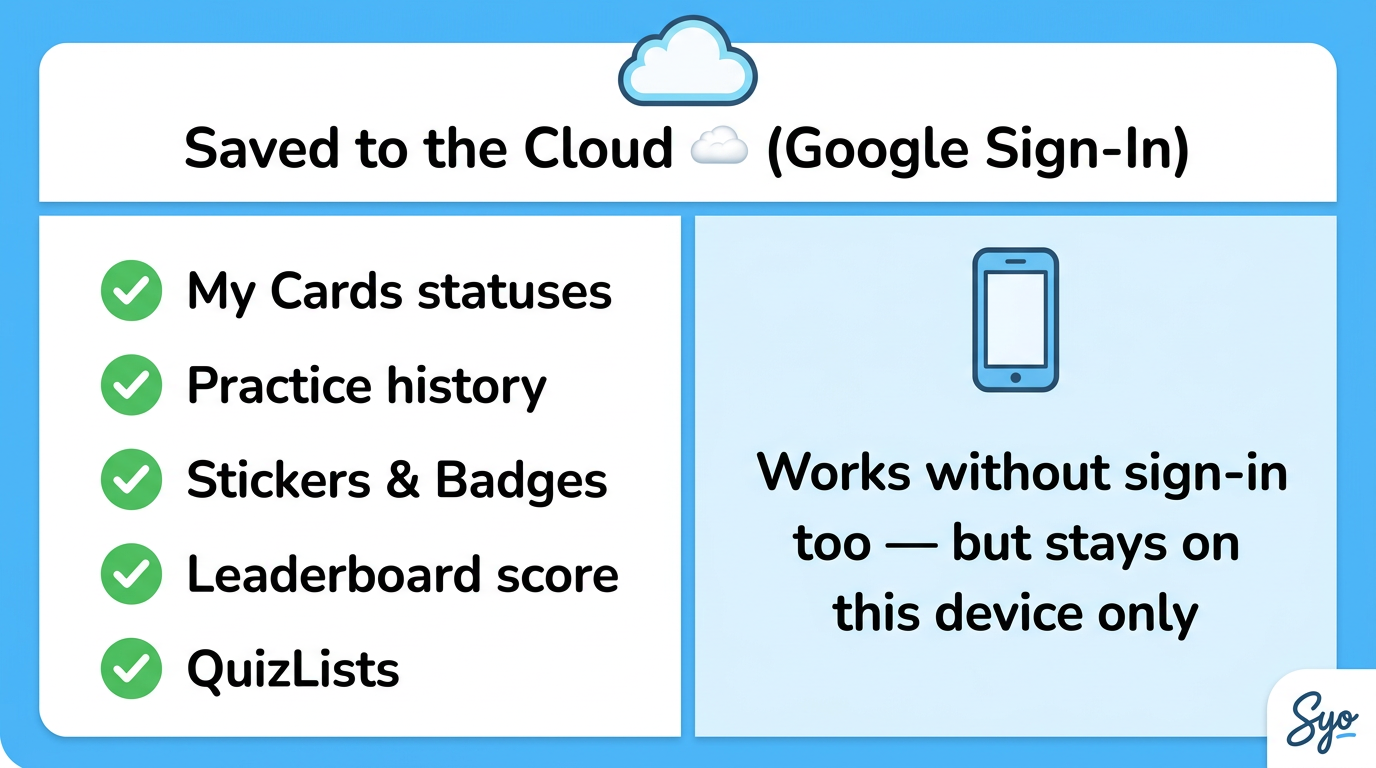
Sign In with Google — tap the Account button to sign in. Signing in syncs your My Cards statuses, practice history, stickers, and leaderboard score to the cloud. This means your progress is safe even if you switch devices or clear the app.
Without signing in, everything saves on this device only.
Voice Speed — drag the slider and tap Preview to set how fast questions are read aloud. Set it once and forget it.
Customize Nav Bar — choose which 2 tabs appear in the bottom bar alongside Practice and My Cards.
Practice Report — see active practice time per profile, filter by date range, and export a PDF to share with Coach Korinne.
📢 Community Tab
▼Find messages from Coach Korinne in the Coach Bulletin Board — practice reminders, encouragements, and team news show up here (and as a banner on the Practice tab when something new is posted).
Tap 🔔 Get Updates from Coach Korinne to subscribe with your email. You'll get a message whenever Coach posts something new.
The Team Chat is a shared space where quizzers can post shoutouts and wins. Keep it encouraging!
📣 Community
📢 Coach Bulletin Board
▼💬 Team Chat
▼at top to change